Claude prompt caching has one beautiful number and one easy footgun: cache reads cost 0.1× normal input, but cache writes cost more than normal input. Anthropic’s current docs list 5-minute cache writes at 1.25× input price, 1-hour writes at 2×, and cache hits at 0.1× across active Claude models (Anthropic prompt caching docs).
That makes caching a pricing feature, not just a latency feature. If your app repeats a long system prompt, tool schema, example pack, policy bundle, retrieved docs, or multi-turn state, you should be measuring cache writes and reads the same way you measure output tokens.
One wrinkle as of today, June 14, 2026: Anthropic launched Claude Fable 5 on June 9, then posted a June 12 update saying access to Fable 5 and Mythos 5 was suspended while they work to restore it (Anthropic). RouteMux also lists anthropic/claude-fable-5, with prompt cache support, but currently marks it temporarily unavailable on its model page (RouteMux). Build the integration now, keep the model id configurable, and switch it on when access is live.
The cache math developers actually need
Anthropic’s prompt cache stores prompt prefixes. The reusable part must be identical: tools, system content, and messages are considered in that order, and the cache applies up to the block marked with cache_control (Anthropic prompt caching docs).
The useful pricing model is simple. Suppose your reusable prefix is 100,000 input tokens.
| Cache mode | Write cost multiplier | Read cost multiplier | Break-even intuition |
|---|---|---|---|
| No cache | 1.0× every request | none | Pay full input every time |
| 5-minute cache | 1.25× once | 0.1× per hit | Pays off after the first reuse |
| 1-hour cache | 2.0× once | 0.1× per hit | Needs more reuse or longer idle gaps |
For Claude Fable 5, Anthropic lists $10 per million input tokens and $50 per million output tokens in the launch post, and the prompt caching docs list Fable 5 cache prices as $12.50/M for 5-minute writes, $20/M for 1-hour writes, and $1/M for cache hits (Anthropic, prompt caching docs).
Using Anthropic list prices, that 100k-token prefix costs:
- Normal input:
$1.00 - 5-minute write:
$1.25 - 1-hour write:
$2.00 - Cache read:
$0.10
So if the same 100k-token prefix is used twice within the TTL, 5-minute caching costs $1.25 + $0.10 = $1.35, versus $2.00 without caching. The 1-hour cache costs $2.10 for two uses, so it loses at two calls but wins once you have a third call or avoid a cold rewrite after a longer pause.
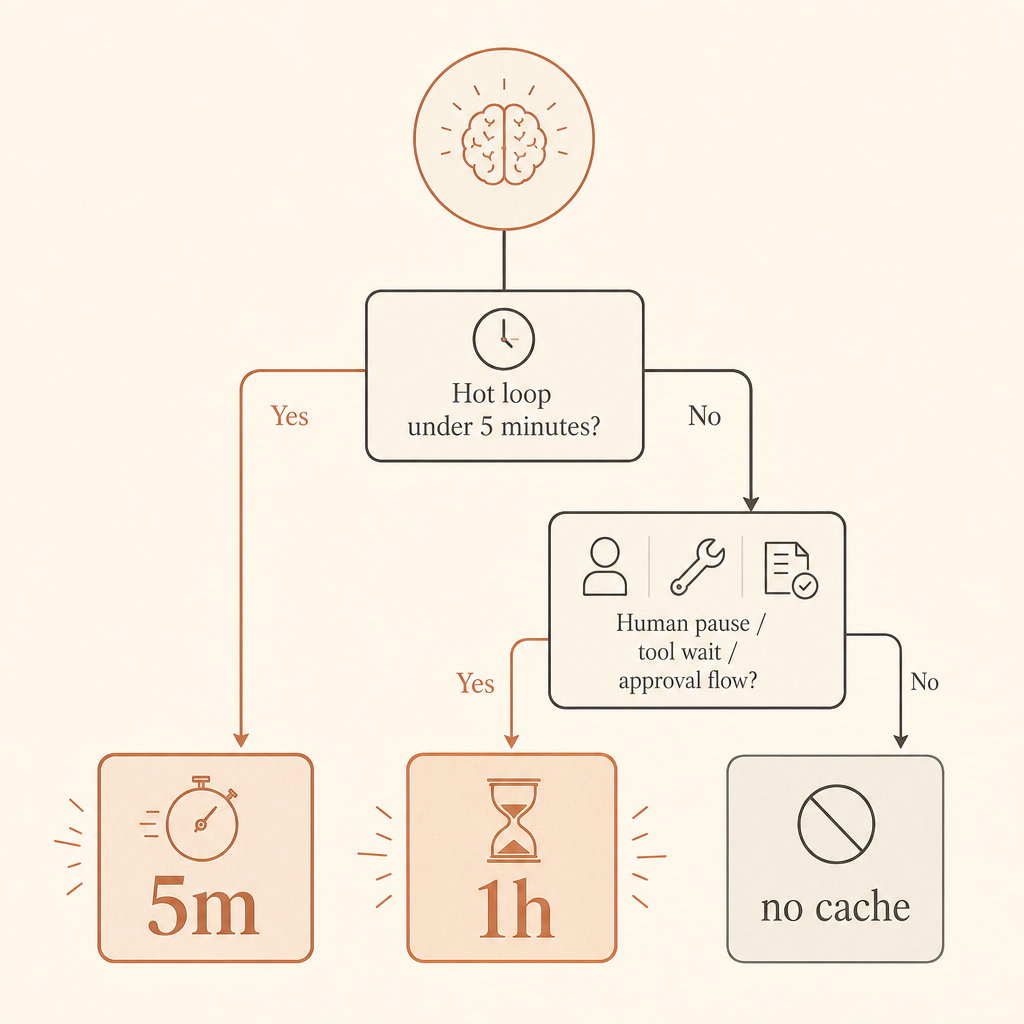
That’s the rule I use in production: default to 5 minutes for hot loops; use 1 hour when humans pause, agents wait on tools, or workflows resume after several minutes.
Two ways to turn caching on
Anthropic now documents two approaches. The fastest path is automatic caching: add a top-level cache_control field and Claude moves the breakpoint forward as the conversation grows. The more controlled path is explicit breakpoints: put cache_control on the last content block in the stable prefix (Anthropic prompt caching docs).
Automatic caching is great for chat history and agent state:
import os
from anthropic import Anthropic

client = Anthropic(
    api_key=os.environ["ROUTEMUX_API_KEY"],
    base_url=os.getenv("ANTHROPIC_BASE_URL", "https://api.routemux.com/v1"),
)

message = client.messages.create(
    model=os.getenv("CLAUDE_MODEL", "anthropic/claude-fable-5"),
    max_tokens=700,
    cache_control={"type": "ephemeral"},
    system="You are a senior backend engineer. Be concise and specific.",
    messages=[
        {"role": "user", "content": "My app uses FastAPI, Postgres, and Redis."},
        {"role": "assistant", "content": "Got it. What do you want to change?"},
        {"role": "user", "content": "Design a cache key strategy for user dashboards."},
    ],
)

print(message.content[0].text)
print(message.usage.model_dump())
RouteMux lists the model as anthropic/claude-fable-5 behind an Anthropic Messages endpoint at https://api.routemux.com/anthropic, priced 72% below Anthropic’s official rate — $2.80/M input and $14/M output against $10 / $50 list. Claude models there need a funded balance before the first call (RouteMux).
Explicit caching is better when the prefix is stable but the user message changes every request. Put the breakpoint before the changing part:
from anthropic import Anthropic
import os

client = Anthropic(
    api_key=os.environ["ROUTEMUX_API_KEY"],
    base_url="https://api.routemux.com/v1",
)

response = client.messages.create(
    model="anthropic/claude-fable-5",
    max_tokens=500,
    system=[
        {
            "type": "text",
            "text": open("system_prompt.md").read(),
            "cache_control": {"type": "ephemeral"},
        }
    ],
    messages=[
        {"role": "user", "content": "Review this migration plan for race conditions."}
    ],
)

print(response.usage.model_dump())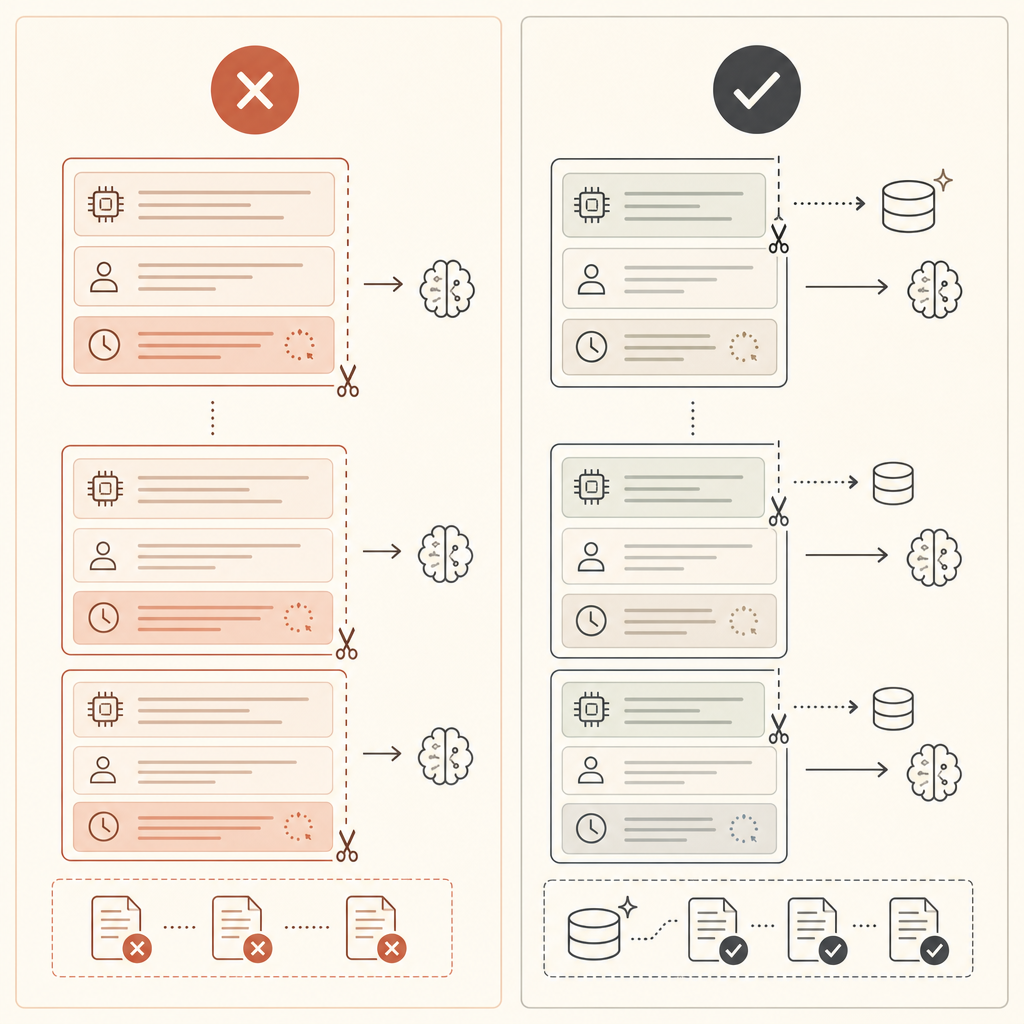
TypeScript version with a 1-hour TTL
Use 1-hour caching when the app has expensive static context and realistic idle gaps. Think: code review agents waiting on CI, customer-support copilots where humans pause, legal research sessions, or multi-step data analysis where tools take several minutes.
Anthropic’s docs show the 1-hour TTL as {"type":"ephemeral","ttl":"1h"} and state that automatic caching uses 5 minutes by default (Anthropic prompt caching docs).
import Anthropic from "@anthropic-ai/sdk";
import fs from "node:fs";

const client = new Anthropic({
  apiKey: process.env.ROUTEMUX_API_KEY!,
  baseURL: process.env.ANTHROPIC_BASE_URL ?? "https://api.routemux.com/v1",
});

const policyPack = fs.readFileSync("policy-pack.md", "utf8");

const msg = await client.messages.create({
  model: process.env.CLAUDE_MODEL ?? "anthropic/claude-fable-5",
  max_tokens: 800,
  system: [
    {
      type: "text",
      text: policyPack,
      cache_control: { type: "ephemeral", ttl: "1h" },
    },
  ],
  messages: [
    {
      role: "user",
      content: "Apply the policy pack to this refund request: customer used 3 of 10 seats.",
    },
  ],
});

console.log(msg.content);
console.log(msg.usage);
The important bit is boring: don’t hide the model and base URL deep in code. Keep both in environment variables. Today’s Fable 5 availability is moving; your integration should be able to fall back to another active Claude model without editing business logic.
What to monitor in usage
Prompt caching is invisible until you inspect usage fields. Anthropic says to verify caching by checking fields such as cache_creation_input_tokens and cache_read_input_tokens; if both are zero, the prompt was not cached, often because it missed the model’s minimum cacheable length (Anthropic prompt caching docs).
Log these per request:
const usage = msg.usage;

console.log({
  input: usage.input_tokens,
  output: usage.output_tokens,
  cacheCreate: usage.cache_creation_input_tokens,
  cacheRead: usage.cache_read_input_tokens,
});
For newer usage objects, Anthropic’s docs also show cache creation broken into TTL-specific buckets such as ephemeral_5m_input_tokens and ephemeral_1h_input_tokens. Capture the full usage object at first. Normalize it later once you know exactly which gateway and SDK version you are running.
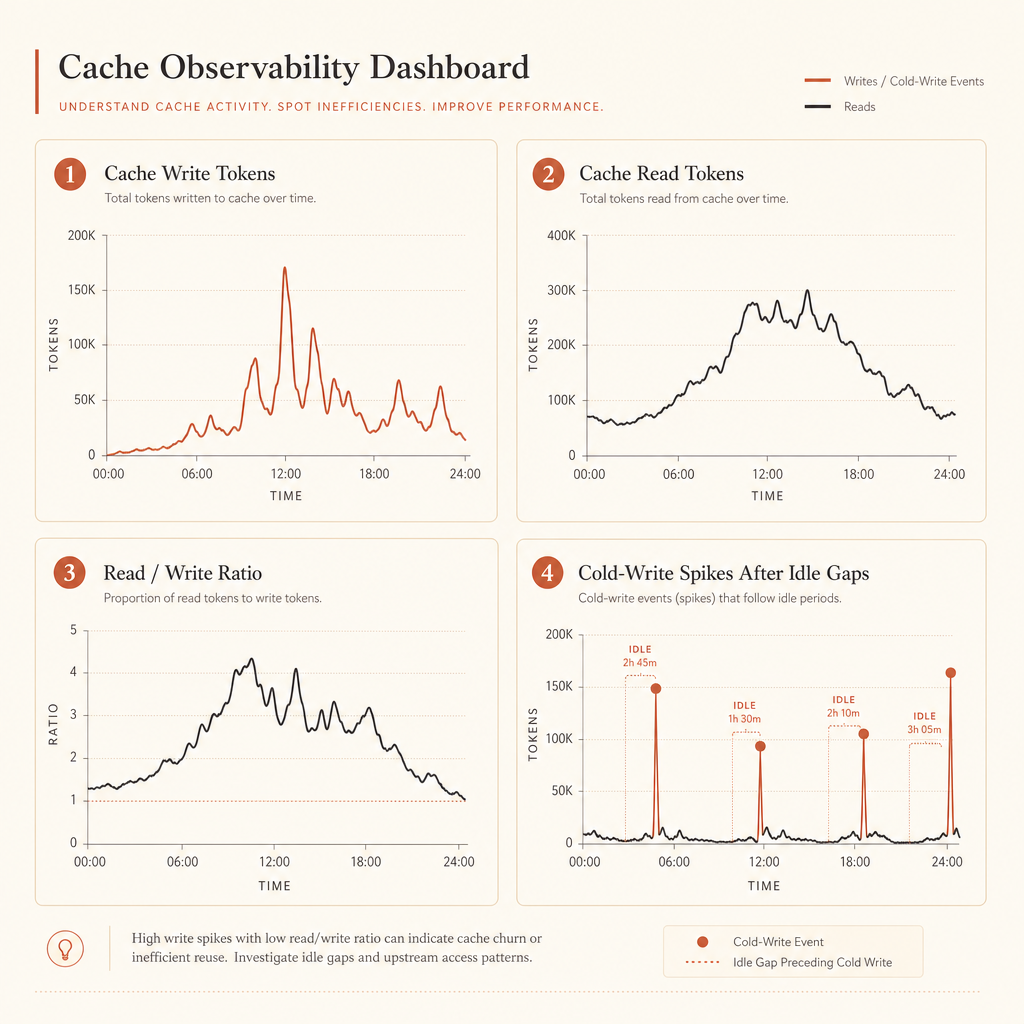
Good dashboards answer four questions:
- How many tokens are being written to cache?
- How many are being read from cache?
- What is the cache read/write ratio by route?
- Which prompts create large cold writes after idle gaps?
If cache_creation_input_tokens is high and cache_read_input_tokens stays near zero, your breakpoint is probably after changing content. Move it earlier.
5-minute or 1-hour: pick by user behavior
Use 5-minute caching for tight request loops. A coding agent that calls tools every 20 seconds, a chat app where users send follow-ups quickly, or a batch of similar classification jobs should start there. The write premium is only 1.25× and every read refreshes the cache lifetime for free, according to Anthropic’s docs (Anthropic prompt caching docs).
Use 1-hour caching when the expensive prefix is likely to be reused after more than five minutes. Human-in-the-loop workflows are the classic case. So are long-running agents where the model sends work to external systems, waits on a browser, polls CI, or pauses for approval.
Do not cache tiny prompts. Anthropic documents minimum cacheable prompt lengths by model and platform; for Fable 5, the Claude API minimum is listed as 512 tokens, while Bedrock has different minimums for some models (Anthropic prompt caching docs). Shorter prompts may simply process without caching.
A practical checklist:
- Put stable content first: tools, system prompts, examples, reference docs.
- Keep changing data after the cached prefix: timestamps, request ids, user text.
- Start with automatic caching for conversations.
- Switch to explicit breakpoints when your suffix changes every call.
- Use 1-hour TTL only when idle gaps justify the 2× write.
- Log usage fields before declaring victory.
Wire it through RouteMux, then measure
The cleanest integration is a one-line endpoint change plus env-configured model selection:
export ROUTEMUX_API_KEY="..."
export ANTHROPIC_BASE_URL="https://api.routemux.com/v1"
export CLAUDE_MODEL="anthropic/claude-fable-5"
Then keep your Anthropic Messages code and add cache_control.
If you want the short route, open Claude Fable 5 on RouteMux and top up to start calling it.
If you want to try Claude Fable 5.1 yourself, you can reach it through Claude Fable 5.1 on RouteMux — a drop-in endpoint at 72% below Anthropic’s official pricing. Add a balance and start calling it; whatever you don’t spend is refundable.