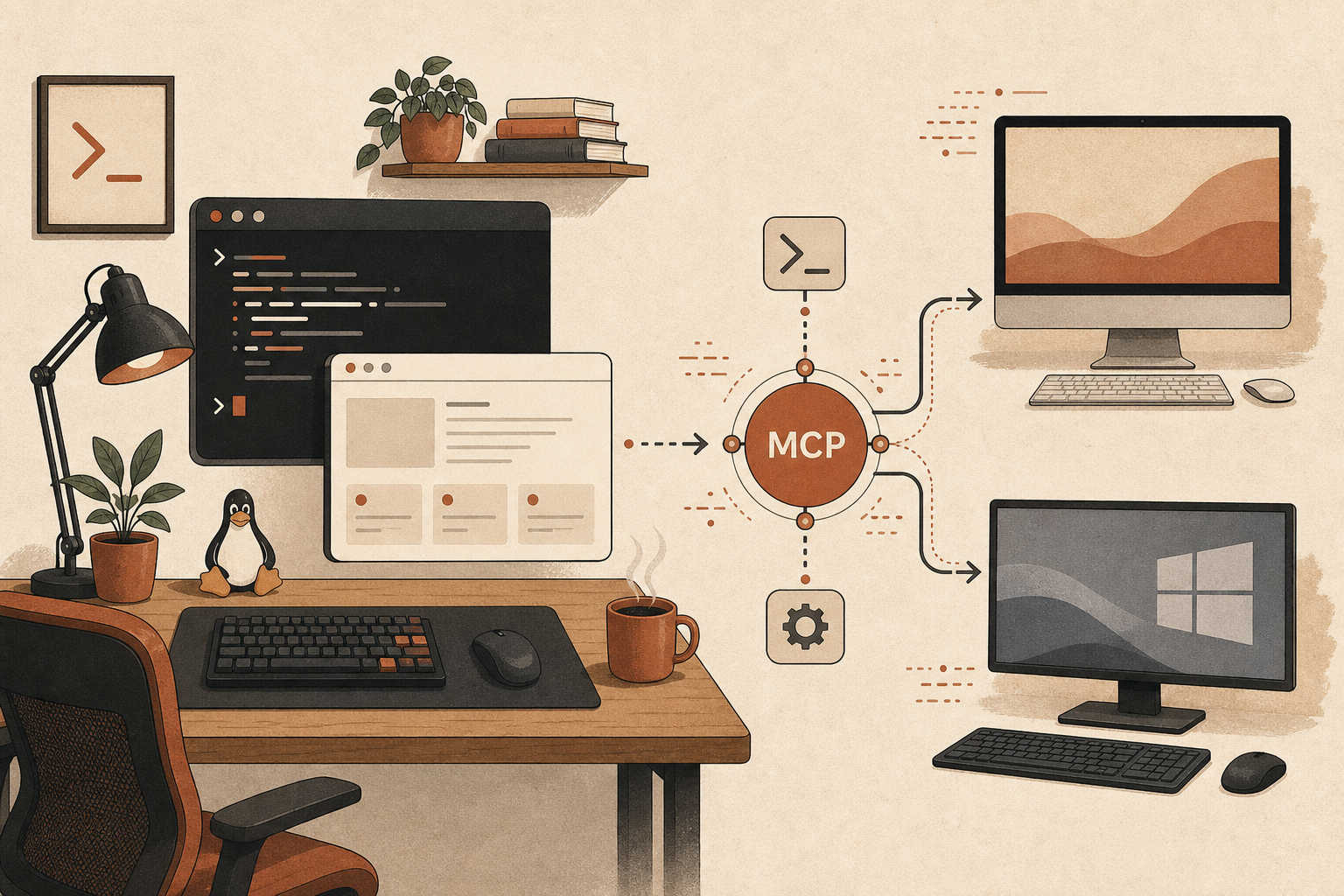
On June 20, 2026, the official answer is still blunt: Claude Desktop is not available for Linux.
Anthropic’s own install guide for Claude Desktop lists system requirements for macOS 11+ and Windows 10+ only, last updated April 24, 2026 (Anthropic Help Center). The public download page is even clearer: macOS, Windows, Windows on Arm, ChromeOS via Google Play, then “Not available for Linux” (Claude download page). That line explains why a June Hacker News thread asking Anthropic to ship an official Linux build hit 538 points and 305 comments in one mirror capture (HN thread, mirror).
The right response is not “just install a random .deb.” Linux developers have better options. My position: use the official Claude Code CLI on Linux for real development work, wire MCP there, and treat unofficial Desktop repackages as personal-use experiments unless you have audited the supply chain yourself.
The Missing App Is Annoying, But Not the Whole Product
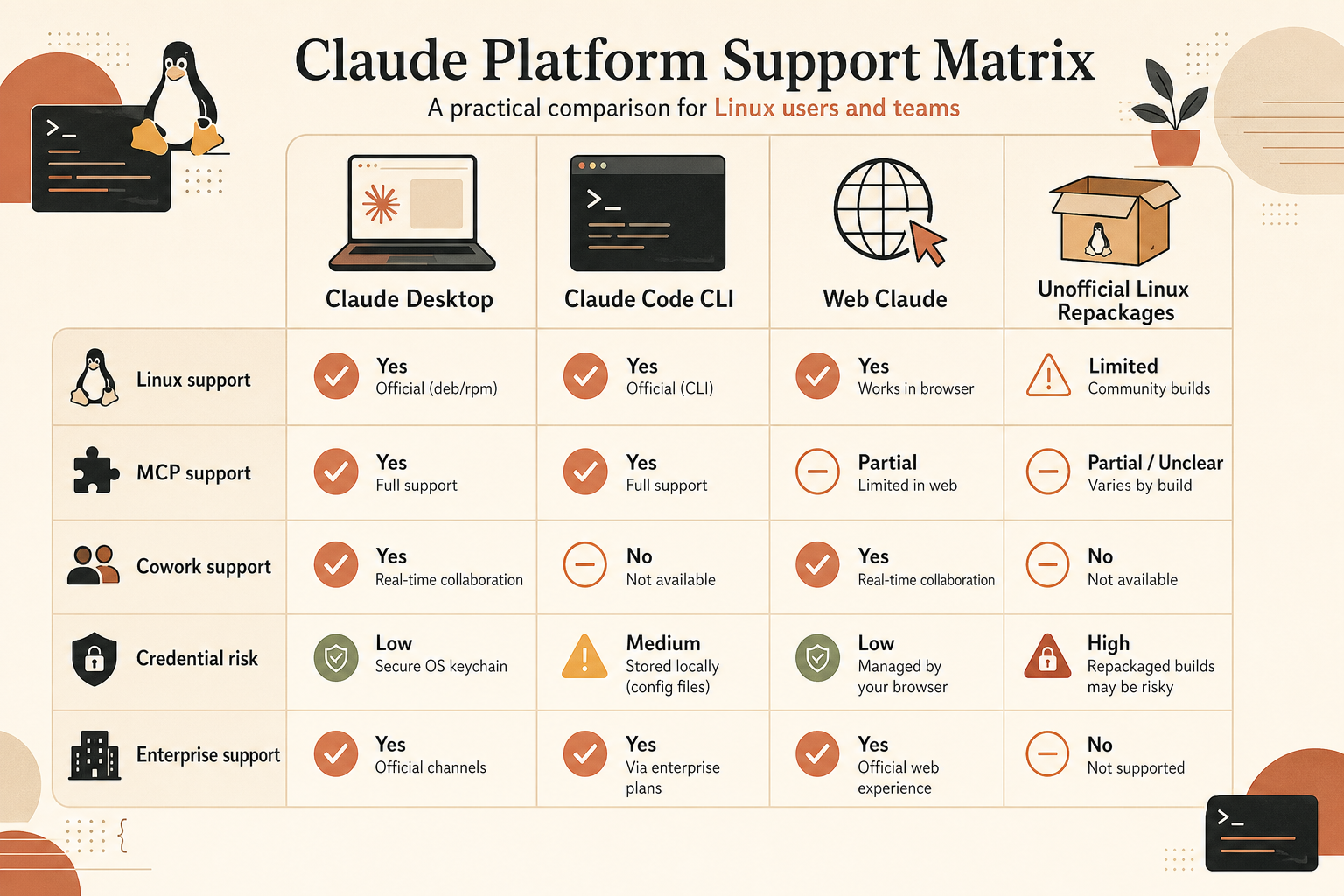
The community frustration is reasonable because Desktop is no longer just a chat wrapper. Anthropic’s Desktop help page says extensions can connect Claude to local files, calendars, email, messaging apps, and a curated extension directory, with code signing, encrypted storage for secrets, and enterprise policy controls (Anthropic Help Center). It also says Claude Cowork is available to paid plans through Desktop and brings Claude Code-style agentic work to a visual interface.
That matters. Desktop is where Anthropic is putting the low-friction UX: one-click desktop extensions, local file access, Cowork, quick entry, and mobile handoff. The download page says the desktop app differs from the browser because it includes system-level access and desktop extensions (Claude download page). If you are building or testing desktop extensions, or if you want Cowork’s visual task handoff, the Linux gap is real.
But most Linux developers asking for Desktop actually want one of three things:
| Need | Best Linux path today | Why |
|---|---|---|
| Coding agent in a repo | Claude Code CLI | Official Linux support and package repos |
| MCP access to tools | Claude Code MCP | Works with local stdio and remote HTTP servers |
| Visual Cowork UI | macOS/Windows Desktop | No official Linux build |
| Desktop extension testing | macOS/Windows Desktop, or risky unofficial Linux port | Desktop-specific surface |
| Casual chat | claude.ai in browser | No install, lowest local risk |
The mistake is treating “no Desktop” as “no supported Claude on Linux.” That is false.
The Official Linux Path: Claude Code Plus MCP
Anthropic’s Claude Code setup page lists Ubuntu 20.04+, Debian 10+, and Alpine Linux 3.19+ as supported operating systems, with x64 or Arm64 processors and 4 GB+ RAM (Claude Code docs). It also publishes Linux install options through the shell installer, npm, and signed apt, dnf, and apk repositories. The apt repo setup even includes a GPG fingerprint: 31DD DE24 DDFA B679 F42D 7BD2 BAA9 29FF 1A7E CACE (Claude Code docs).
For a Debian or Ubuntu workstation, the boring official path looks like this:
curl -fsSL https://claude.ai/install.sh | bash
claude --version
claude doctor
If you prefer system package updates:
sudo install -d -m 0755 /etc/apt/keyrings
sudo curl -fsSL https://downloads.claude.ai/keys/claude-code.asc \
  -o /etc/apt/keyrings/claude-code.asc
echo "deb [signed-by=/etc/apt/keyrings/claude-code.asc] https://downloads.claude.ai/claude-code/apt/stable stable main" \
  | sudo tee /etc/apt/sources.list.d/claude-code.list
sudo apt update
sudo apt install claude-code
That gets you the part most developers use all day: a repo-aware agent in the terminal, running on the same Linux filesystem, toolchain, tests, containers, and shell scripts you already trust.
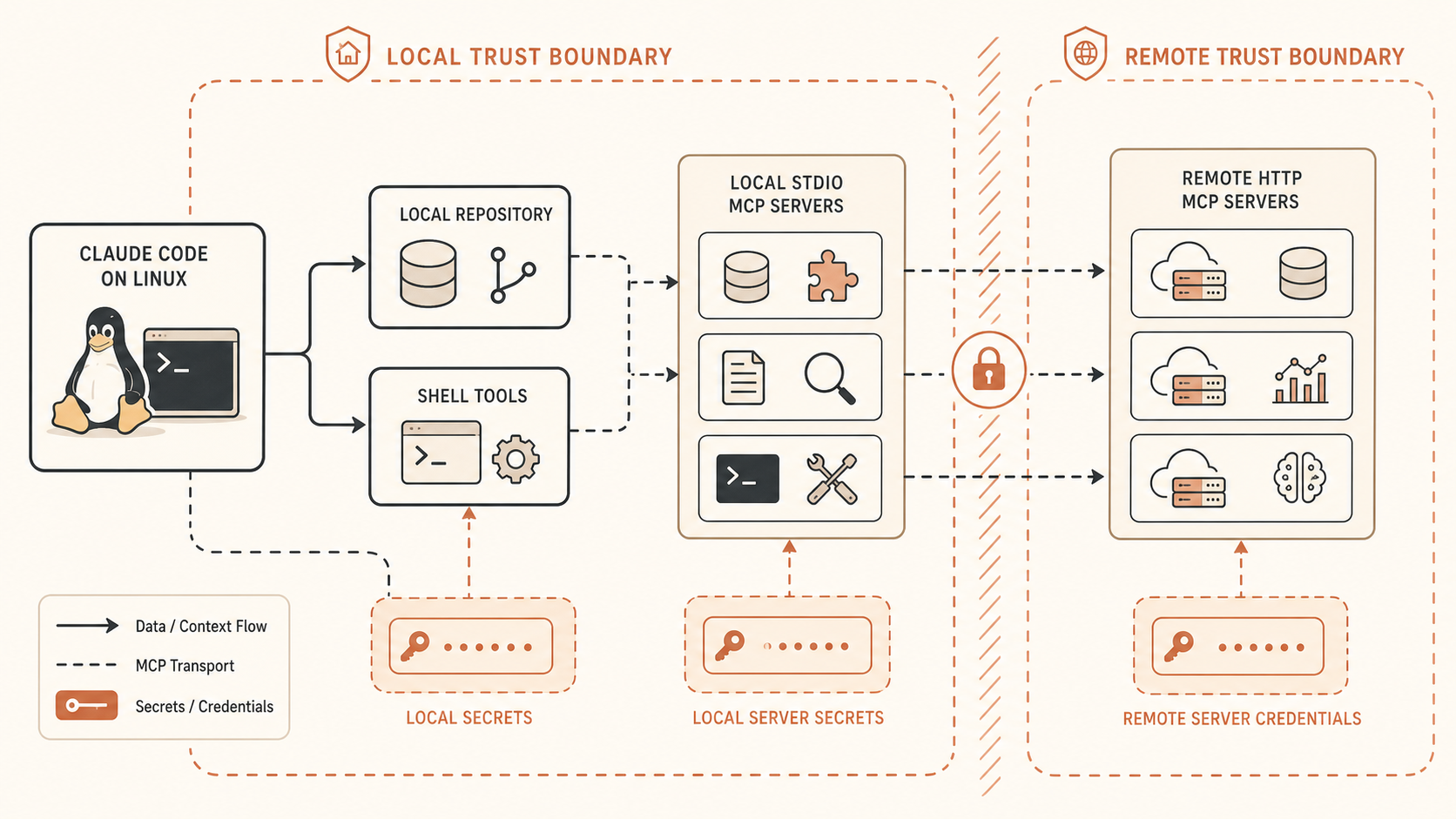
MCP is also not Desktop-only. Claude Code can connect to external tools and data sources through MCP, which the official docs describe as an open standard for AI-tool integrations (Claude Code MCP docs). The MCP project describes it as an open-source standard for connecting AI apps to local files, databases, tools, and workflows (Model Context Protocol).
A remote HTTP MCP server is one command:
claude mcp add --transport http notion https://mcp.notion.com/mcp
claude mcp list
A local stdio MCP server works too:
claude mcp add --env AIRTABLE_API_KEY="$AIRTABLE_API_KEY" \
  --transport stdio airtable -- npx -y airtable-mcp-server
That covers the workflow most people mean when they say, “I need Claude Desktop for MCP.” If you need Claude to read Jira, query Postgres, inspect Sentry, or interact with a custom internal tool, do it through Claude Code on Linux. You lose the Desktop extension marketplace UI. You do not lose MCP.
Where Desktop Still Wins: Cowork and Extensions
There are Desktop-only features. Pretending otherwise is how teams end up with bad workarounds.
Desktop extensions are packaged local MCP servers with nicer installation and admin controls. Anthropic’s local MCP Desktop guide says extensions replace manual JSON and dependency management with one-click installable packages, can be distributed as .mcpb files, support Node.js, Python, and binary MCP servers, and store sensitive fields using OS secure storage such as Keychain on macOS and Credential Manager on Windows (Anthropic Help Center). That packaging story is useful for non-terminal users and enterprise rollout.
Cowork is also Desktop-bound. Anthropic’s Cowork docs say it requires the Desktop app for macOS or Windows and is not available on web or mobile (Anthropic Help Center). The install page says Cowork is available on paid plans and lets Claude access connected folders, run long tasks, coordinate parallel workstreams, and deliver outputs like spreadsheets and presentations (Anthropic Help Center). Pricing currently shows Pro at $17/month annually or $20 monthly, Max from $100/month, and Team standard seats at $20/seat/month annually or $25 monthly, with Claude Code and Cowork included in paid tiers (Claude pricing).
Security-wise, Cowork is not a toy. Anthropic’s architecture overview says Cowork uses two execution environments: an agent loop running natively on the device for conversation handling, connected-folder file access, web fetches, and local plugin MCP servers; and code execution inside an isolated Linux VM, using Apple Virtualization.framework on macOS and Hyper-V on Windows (Anthropic Help Center). It also says EDR tools cannot inspect inside the VM and Cowork activity is not currently captured in audit logs, the Compliance API, or data exports.
That changes the decision. If your company needs auditability and endpoint visibility, “Desktop on a random Linux port” is not an acceptable shortcut. If your team needs Cowork, use a supported macOS or Windows host until Anthropic ships Linux.
The Unofficial Builds Are Impressive. That Does Not Make Them Safe by Default
The leading community project, aaddrick/claude-desktop-debian, is not a sketchy one-file script. Its README says it repackages the official Windows application for Linux and produces .deb, .rpm, AppImage, AUR, and Nix builds; it also calls itself an unofficial build script and points users to Anthropic for official support (GitHub). As of the page captured here, GitHub showed roughly 5k stars and 496 forks. The project documents MCP config at ~/.config/Claude/claude_desktop_config.json, package repositories, GPG setup, a --doctor diagnostic, and broad distro integration.
That is serious engineering. It also proves the hard part of the debate.
In the HN thread, the project maintainer joined the discussion and said the scope had grown beyond Debian to “all backends, compositors, etc.” The same thread turned into a practical argument about Linux desktop fragmentation: Wayland global shortcuts, xdg-desktop-portal backends, tray icons, GNOME behavior, KDE behavior, and support tickets from unsupported distributions (HN mirror). That is the best counterargument to “it is just Electron, ship it.”
Still, the security issue remains. Claude Desktop handles login state, local files, API keys, MCP servers, extension configs, and sometimes agentic file writes. A third-party repackage may be honest, transparent, and well maintained. It is still not vendor-signed by Anthropic, not supported by Anthropic, and not covered by Anthropic’s enterprise deployment controls.
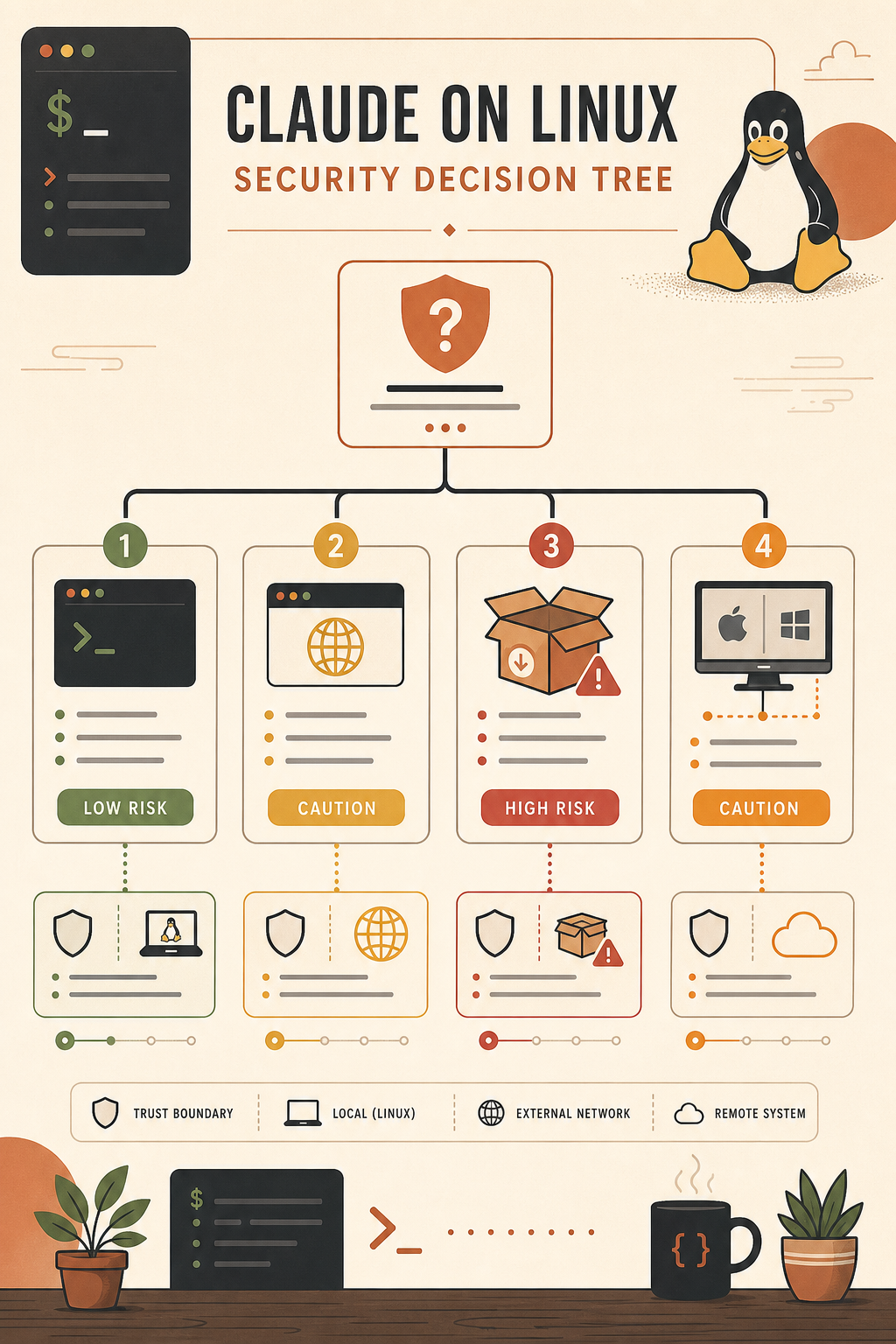
My rule:
- Personal experimentation on a disposable profile: maybe.
- Daily work on private repos: only if you have reviewed the build chain and update path.
- Company laptop with customer data: no.
- Desktop extensions that handle secrets: no, unless security has approved the package source.
- Cowork-style local agent workflows: use a supported OS host.
The uncomfortable truth is that Linux users are being pushed toward a trust decision they should not have to make. But “Anthropic should fix this” and “you should install an unofficial credential-handling app” are different statements.
A Practical Linux Setup That Covers 80 Percent
Here is the setup I would recommend to a Linux-heavy dev team today.
First, standardize on Claude Code from Anthropic’s signed Linux repo. Put the install method in your workstation bootstrap scripts. Pin the stable channel for most users, and let a small group use latest if they want early features.
Second, keep MCP configuration project-local where possible. Claude Code supports MCP scopes and .mcp.json; use project scope for repo-specific tools and user scope for personal tools. Do not bury production credentials in a global config shared across unrelated projects. Use environment variables or your normal secret manager.
Third, split local and remote MCP servers by risk. A local stdio server that reads your repo is fine if it is your code. A local stdio server installed from npm that can read your home directory deserves a much harder look. Remote HTTP MCP servers are easier to centralize, log, rotate, and revoke.
Fourth, use the browser for chat, research, and artifacts when you do not need local tools. The web app is boring, and boring is good for tasks that do not need workstation access.
Fifth, provide a supported Desktop island for the minority of workflows that truly need Desktop. That could be a managed Mac mini, a Windows VM with Hyper-V support, or a small set of macOS/Windows workstations used for Desktop extension QA and Cowork. It is clunky, but it keeps credential handling and vendor support clean.
This is less satisfying than a native Linux app. It is also more secure than asking every engineer to choose between productivity and supply-chain hygiene.
What Anthropic Should Do Next
Anthropic does not need to support every distro. The most reasonable first-party move would be narrow: Ubuntu LTS and Debian, x64 and Arm64, signed apt repository, explicit support matrix, no promises for random rolling-release desktops. The GitHub feature request makes the same basic ask and notes that Claude Code already has a Linux distribution pipeline (GitHub issue #65697).
If Anthropic will not ship Linux Desktop in 2026, it should say that plainly. A public “not on the roadmap” with security guidance would be better than silence. Recommend the official CLI path. Document which Desktop features have no Linux equivalent. Explain whether third-party repackages are unsupported and what risks users should evaluate. Developers can handle “no.” They hate guessing.
Until then, Linux developers should be pragmatic. Use Claude Code as the official native Linux surface. Use MCP there. Avoid unofficial Desktop builds for sensitive work. Keep a supported macOS or Windows path for Cowork and Desktop extension testing. That is not the dream Linux-native Claude workstation, but it is a clean workflow you can defend in a security review.
If you want to try Claude Fable 5.1 yourself, you can reach it through RouteMux’s Claude Fable 5.1 endpoint — a drop-in endpoint at 72% below Anthropic’s official pricing. Add a balance and create an account; whatever you don’t spend is refundable.
Further reading: Getting started with Claude Fable 5.