Anthropic put a hard number on a problem every heavy Claude Code user already feels: users approved about 93% of permission prompts, and the company says attention drops as prompts pile up (Anthropic). That is approval fatigue, and it turns “human in the loop” into “human holding Enter.”
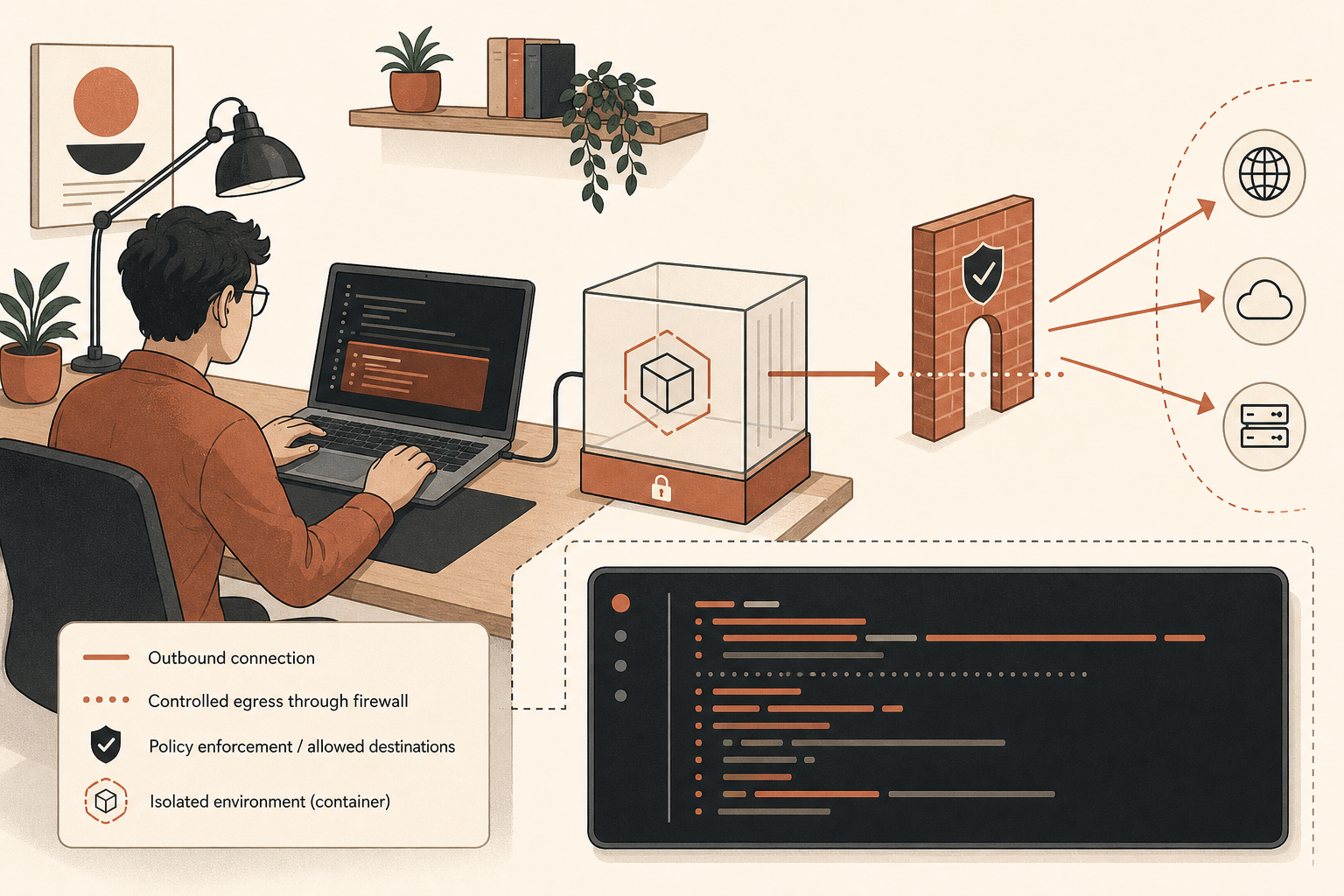
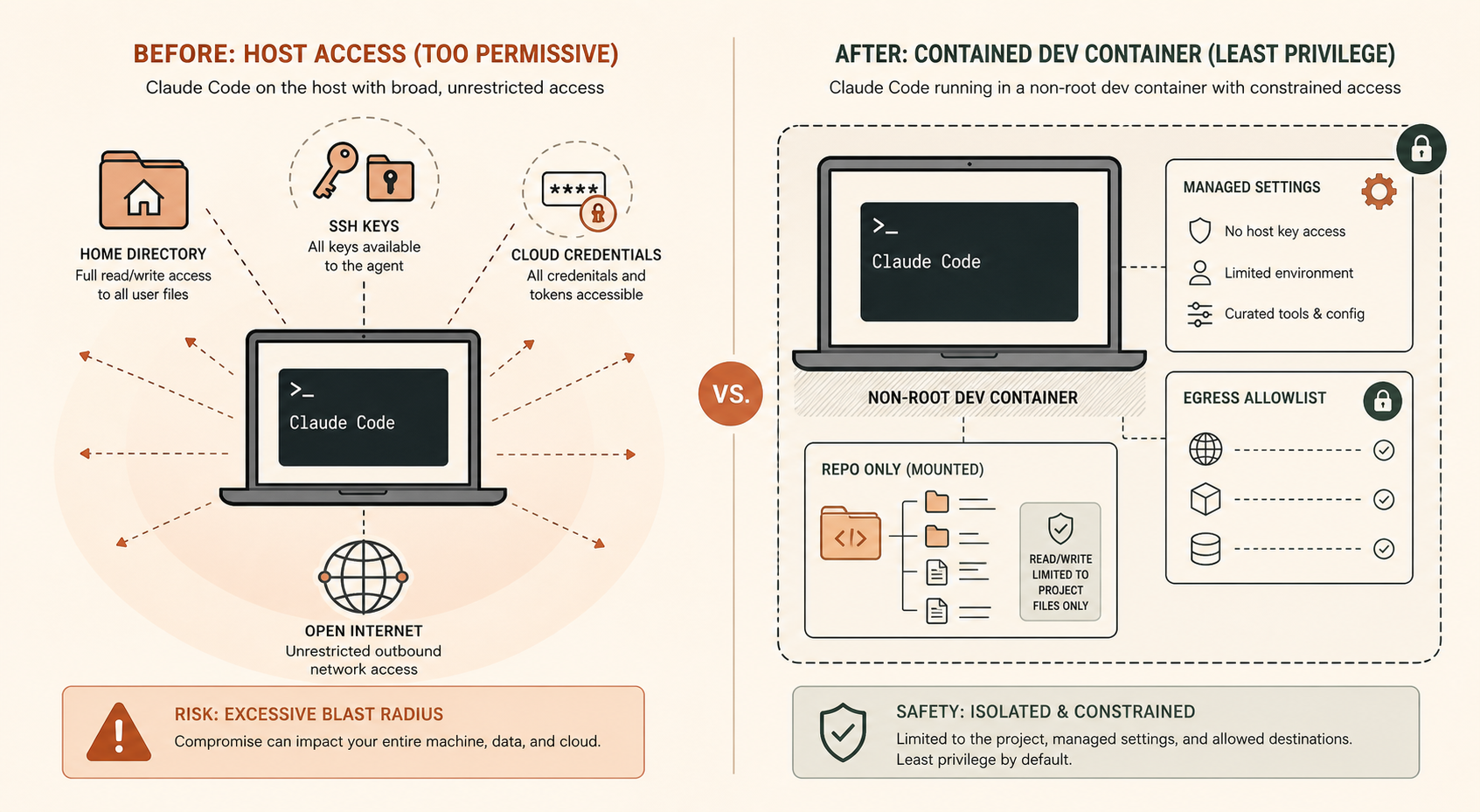
The wrong response is to run --dangerously-skip-permissions on your laptop and hope the model behaves. The right response is boring security engineering: put Claude Code in a dev container, give it only the repo, restrict outbound traffic, disable bypass mode by policy, and use auto mode only where it is actually supported.
This guide shows a runnable setup you can drop into a repo today. It also covers the current community argument: developers want agents to be more autonomous, but they do not want invisible guardrails or black-box file crawling. The practical answer is not “trust Claude harder.” It is “make the blast radius small enough that autonomy becomes acceptable.”
The Debate Is Really About Observability and Blast Radius
The Hacker News thread around “Anthropic tries to hide Claude’s AI actions” is not just complaint theater. One commenter summed up the developer fear: if an agent starts opening stale config or crawling irrelevant files, the operator needs to know fast enough to stop it (Hacker News). Another thread about running Claude Code “dangerously” converged on the same practical pattern: run the agent freely, but only inside a sandbox with limited file and network access (Hacker News).
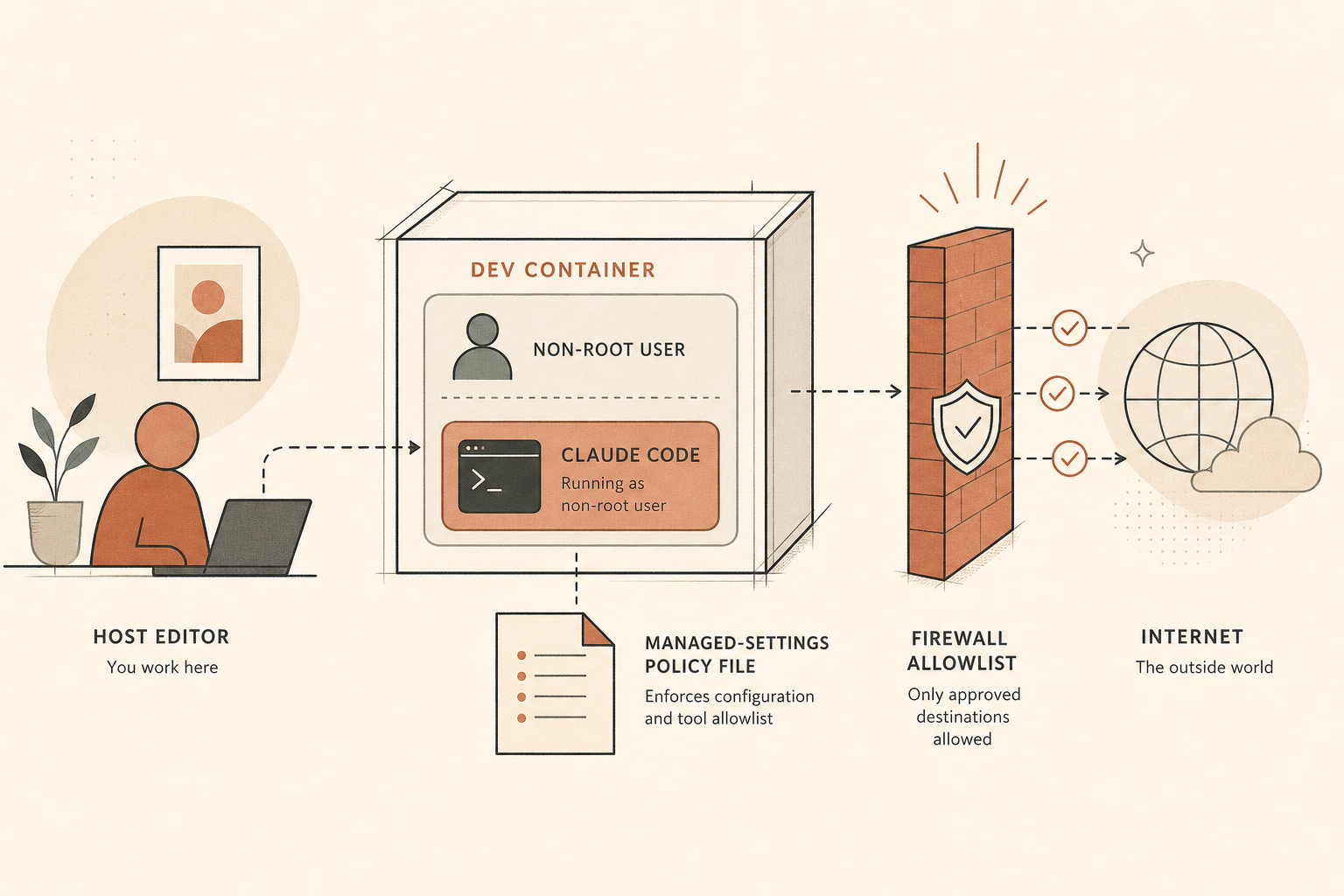
Anthropic’s own engineering post lands in the same place. It separates defenses into environment, model, and external content. The environment is the part you can make deterministic. If credentials never enter the sandbox, Claude cannot exfiltrate them, whether the cause is a prompt injection, model overreach, or a bad user instruction (Anthropic).
Auto mode fits here, but it is not magic. Anthropic says auto mode uses a separate classifier to review actions before they run, and its docs call it a research preview, not a replacement for review on sensitive operations (Claude Code docs). That distinction matters. Auto mode reduces prompts. Containers reduce consequences.
Here is the stance I recommend for teams:
| Mode | Use it for | Do not use it for |
|---|---|---|
plan | unfamiliar repos, risky changes | long unattended edits |
acceptEdits | normal feature work | deploys, secrets, infra changes |
auto | isolated dev containers with egress control | production systems or unknown repos |
bypassPermissions | disposable VMs only | developer laptops |
Anthropic’s docs say auto mode requires Claude Code v2.1.83 or later. On the Anthropic API, supported models include Claude Opus 4.6 or later and Sonnet 4.6. On Bedrock, Vertex AI, and Microsoft Foundry, the docs list only Opus 4.7 and Opus 4.8 for auto mode (Claude Code docs).
Build the Dev Container
Create three files in your repo:
.devcontainer/
  devcontainer.json
  Dockerfile
  managed-settings.json
Start with .devcontainer/devcontainer.json:
{
  "name": "claude-code-safe",
  "build": {
    "dockerfile": "Dockerfile"
  },
  "remoteUser": "node",
  "mounts": [
    "source=claude-code-config-${devcontainerId},target=/home/node/.claude,type=volume"
  ],
  "runArgs": [
    "--cap-add=NET_ADMIN",
    "--cap-add=NET_RAW"
  ],
  "containerEnv": {
    "CLAUDE_CODE_DISABLE_NONESSENTIAL_TRAFFIC": "1",
    "DISABLE_AUTOUPDATER": "1",
    "ANTHROPIC_BASE_URL": "https://api.routemux.com/anthropic",
    "ANTHROPIC_API_KEY": "${localEnv:ROUTEMUX_API_KEY}"
  },
  "postCreateCommand": "sudo /usr/local/bin/init-firewall.sh"
}
Anthropic’s dev container docs recommend running Claude Code inside a container so commands execute away from the host, while edits still appear in the mounted repo (Claude Code docs). They also warn not to mount host secrets such as ~/.ssh or cloud credential files. Follow that advice. If Claude needs a repo-scoped GitHub token, pass a short-lived one through the environment. Do not bind-mount your entire home directory because it is convenient.
Now the Dockerfile:
FROM mcr.microsoft.com/devcontainers/javascript-node:22

RUN npm install -g @anthropic-ai/claude-code@latest

COPY managed-settings.json /etc/claude-code/managed-settings.json
COPY init-firewall.sh /usr/local/bin/init-firewall.sh

RUN chmod +x /usr/local/bin/init-firewall.sh
The Anthropic docs also provide a Dev Container Feature, but installing through the Dockerfile makes policy and versioning easier to reason about in a team repo. If you want reproducibility, pin @anthropic-ai/claude-code to a specific version and keep DISABLE_AUTOUPDATER=1.
Lock Down Permissions Before You Enable Auto Mode
Create .devcontainer/managed-settings.json:
{
  "permissions": {
    "defaultMode": "auto",
    "disableBypassPermissionsMode": "disable",
    "deny": [
      "Read(./.env)",
      "Read(./.env.*)",
      "Read(./secrets/**)",
      "Read(./config/credentials.json)",
      "Bash(curl *)",
      "Bash(wget *)",
      "Bash(git push *)",
      "Bash(kubectl *)",
      "Bash(terraform apply *)",
      "WebFetch(domain:169.254.169.254)"
    ],
    "ask": [
      "Bash(npm publish *)",
      "Bash(docker push *)",
      "Bash(gh release *)"
    ],
    "allow": [
      "Bash(npm install)",
      "Bash(npm test *)",
      "Bash(npm run lint *)",
      "Bash(git diff *)",
      "Bash(git status *)"
    ]
  },
  "autoMode": {
    "environment": {
      "trustedDomains": [
        "registry.npmjs.org",
        "github.com"
      ]
    }
  }
}
Two details are doing real work here.
First, disableBypassPermissionsMode blocks bypassPermissions and disables the --dangerously-skip-permissions flag when enforced through managed settings. Anthropic documents this exact control in its settings reference (Claude Code docs).
Second, deny rules still matter in auto mode. Anthropic says auto mode blocks actions that escalate beyond the request, target unrecognized infrastructure, or appear driven by hostile content, but you should not outsource your team’s policy to a classifier. If nobody should run terraform apply from an agent session, encode that as a deny rule.
One caveat: repository-managed policy can be edited by anyone who can edit the repo. Anthropic’s docs say /etc/claude-code/managed-settings.json has high precedence inside Linux, but for policy that developers cannot bypass by editing repo files, use server-managed settings or MDM (Claude Code docs). For a startup team, checked-in policy is still a good baseline. For enterprise rollout, do not stop there.
Restrict Egress With a Small Allowlist
Add .devcontainer/init-firewall.sh:
#!/usr/bin/env bash
set -euo pipefail

ALLOWED_HOSTS=(
  api.routemux.com
  api.anthropic.com
  claude.ai
  platform.claude.com
  registry.npmjs.org
  github.com
  raw.githubusercontent.com
)

iptables -P OUTPUT DROP
iptables -A OUTPUT -o lo -j ACCEPT
iptables -A OUTPUT -m conntrack --ctstate ESTABLISHED,RELATED -j ACCEPT

for host in "${ALLOWED_HOSTS[@]}"; do
  for ip in $(getent ahostsv4 "$host" | awk '{print $1}' | sort -u); do
    iptables -A OUTPUT -p tcp -d "$ip" --dport 443 -j ACCEPT
  done
done

iptables -A OUTPUT -p udp --dport 53 -j ACCEPT
iptables -A OUTPUT -p tcp --dport 53 -j ACCEPT
This is intentionally simple. It resolves allowed hostnames at startup and permits TCP 443 to those IPs. For production-grade control, put the container behind a proxy and log every request. But even this basic deny-by-default rule is better than letting an autonomous coding agent talk to the whole internet.
Anthropic’s network docs list required domains such as api.anthropic.com, claude.ai, platform.claude.com, downloads.claude.ai, storage.googleapis.com, and raw.githubusercontent.com, depending on install and auth path (Claude Code docs). If you install through npm and disable auto-updates, you may not need the download domains at runtime. Keep the list tight, then add domains only when builds fail for a known reason.
Run it:
export ROUTEMUX_API_KEY=rmx_your_key_here
code .
# VS Code: Dev Containers: Rebuild and Reopen in Container
claude --permission-mode auto
Inside the container, verify:
whoami
claude --version
curl -I https://api.routemux.com
curl -I https://example.com
The RouteMux request should work. The example.com request should fail unless you added it.
Route Claude Fable 5 Through RouteMux
RouteMux lists the model as anthropic/claude-fable-5 behind an Anthropic Messages endpoint at https://api.routemux.com/anthropic, priced 72% below Anthropic’s official rate — $2.80/M input and $14/M output against $10 / $50 list. Claude models there need a funded balance before the first call (RouteMux).
Current operational note: the RouteMux Fable 5 page says the model is temporarily unavailable while still listed. Keep the config in place, but expect to use it when your account and region have access.
For a direct Anthropic Messages call through RouteMux, use the Anthropic-compatible endpoint RouteMux publishes for this model:
from anthropic import Anthropic

client = Anthropic(
    base_url="https://api.routemux.com/anthropic",
    api_key="rmx_your_key_here",
)

message = client.messages.create(
    model="anthropic/claude-fable-5",
    max_tokens=1024,
    messages=[{"role": "user", "content": "Summarize this repo's test strategy."}],
)

print(message.content[0].text)
If your app already uses RouteMux’s OpenAI-compatible gateway, the one-line base URL change is:
client = OpenAI(base_url="https://api.routemux.com/v1", api_key="rmx_your_key_here")For Claude Code specifically, use the Anthropic-compatible base URL in ANTHROPIC_BASE_URL, because Claude Code speaks the Anthropic Messages API. RouteMux’s Fable 5 model page currently lists Anthropic Messages as available at https://api.routemux.com/anthropic, while OpenAI Chat Completions is marked unsupported for this model (RouteMux).
The Operating Model: Trust Less, Ship Faster
The best Claude Code setup is not the most permissive one. It is the one where mistakes are cheap.
Use plan mode when Claude is exploring a new codebase. Switch to auto only after the task is bounded. Keep bypassPermissions disabled by policy. Deny reads on secrets. Deny deploys, pushes to protected branches, cloud mutations, and metadata endpoints. Put the agent in a non-root dev container. Block egress by default. Review the diff before merge.
That may sound slower than YOLO mode. In practice, it is faster because nobody has to babysit 40 trivial prompts or wonder whether an approval just let a model exfiltrate a token. Anthropic’s own containment post says the reference dev container exists so Claude Code can run unattended without per-action approvals (Anthropic). The missing piece is team policy.
If you want to try Claude Fable 5.1 yourself, you can reach it through Claude Fable 5.1 through RouteMux — a drop-in endpoint at 72% below Anthropic’s official pricing. Add a balance and get a key; whatever you don’t spend is refundable.